Amazon Sponsored Products Bidding Strategies and Placement Adjustments Explained
Two settings quietly decide how much you pay for every Sponsored Products click: the campaign's bidding strategy and its placement adjustments. Many sellers leave the defaults and then wonder why top-of-search clicks cost far more than their keyword bid. Here is how the settings work, how they combine, and how to choose them.
The three bidding strategies
- Dynamic bids – down only. Amazon may lower your bid in real time when a click seems less likely to convert. It never raises it. This is the most conservative option.
- Dynamic bids – up and down. Amazon may raise or lower your bid. According to Amazon Ads' guide to dynamic bidding, "we will increase or decrease your bids by up to 100% for all placements based on performance." Amazon's example: a $1.00 bid can go up to a maximum of $2.00.
- Fixed bids. Amazon uses your exact bid (plus any placement adjustment) and does not change it based on conversion likelihood.
Note: Some older third-party guides say up-and-down can raise bids by 100% for top of search but only 50% elsewhere. Amazon's current guide says up to 100% for all placements. Check Amazon's help pages for the latest rules, as they can change.
Placement adjustments
Sponsored Products ads show in three placements: top of search (first row of results), rest of search and product pages. You can raise your bid for each placement by a percentage. In January 2024, Amazon Ads announced that advertisers can adjust bids for rest of search by up to 900%, the same as the other placements, and that the control works with fixed and dynamic bidding for both auto and manual campaigns.
How they combine: a worked example
The placement adjustment is applied to your bid first, and dynamic bidding can then adjust that amount, as Scale Insights explains. With a $1.00 keyword bid and a +50% top-of-search adjustment, the maximum bid looks like this:
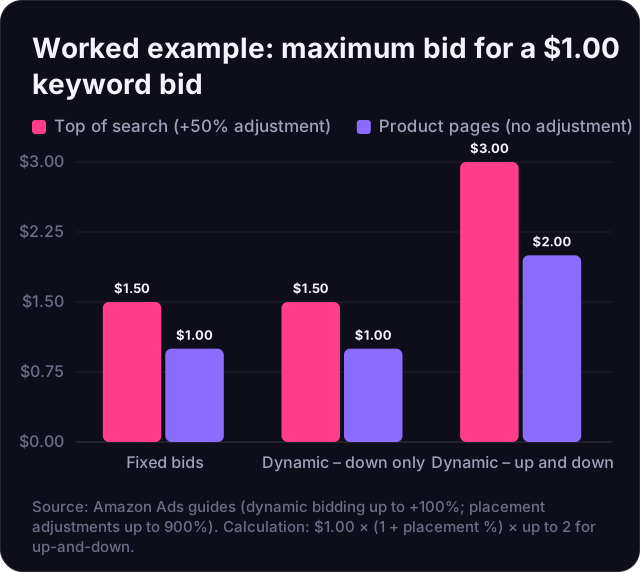
With up-and-down bidding, a $1.00 keyword can reach $3.00 at top of search. That is why a campaign with high placement adjustments and aggressive dynamic bidding can spend much faster than its keyword bids suggest. Remember that Sponsored Products is an auction, so the price you actually pay per click is often below your maximum bid.
Which strategy to use when
| Situation | Suggested strategy | Why |
|---|---|---|
| New campaign, little data | Down only | Limits overspending while you learn which terms convert |
| Proven exact-match keywords with good ACoS | Up and down | Lets Amazon bid harder on clicks likely to convert |
| Branded keywords, defending your own listings | Fixed or up and down | Keeps you visible on searches for your brand |
| Tight budget or thin margin | Down only | Bids never go above your bid plus any placement adjustment |
| Testing placements | Fixed | Makes placement results easier to compare |
These are starting points from our experience, not Amazon rules. Your data should decide.
How to set placement adjustments with data
- Open the placement report for the campaign and look at at least 2–4 weeks of data.
- Compare ACoS and conversion rate by placement. Top of search often converts better but costs more per click.
- Raise the adjustment in small steps (for example 10–25%) only where ACoS is below your target.
- Lower or remove adjustments where ACoS is above target, and consider lowering the base bid.
- Change one thing at a time and wait for new data before the next change.
- Watch budget pacing. If a campaign runs out of budget early in the day, your adjustments may be too high.
Common mistakes
- Combining high placement adjustments with up-and-down bidding on new, unproven keywords.
- Judging a placement on a few days of data.
- Forgetting that a high base bid multiplies through every adjustment.
- Changing strategy, bids and adjustments all at once, then not knowing what worked.
For the bigger picture on efficiency targets, read our guide on lowering ACoS without losing sales.
How Atronia Innovations helps
Our team has managed more than $10M in ad spend. We set bidding strategies and placement adjustments from each client's own data and break-even ACoS, and review them weekly. See our plans or ask for an ads review.