Amazon Brand Registry Growth Tools: What Amazon's Data Says
Many brands register their trademark, enroll in Amazon Brand Registry for protection, and then stop there. That leaves the growth tools that come with Brand Registry unused. This guide walks through the tools that Amazon itself says can lift sales, what the official numbers are, and the order we would set them up in.
What Brand Registry unlocks
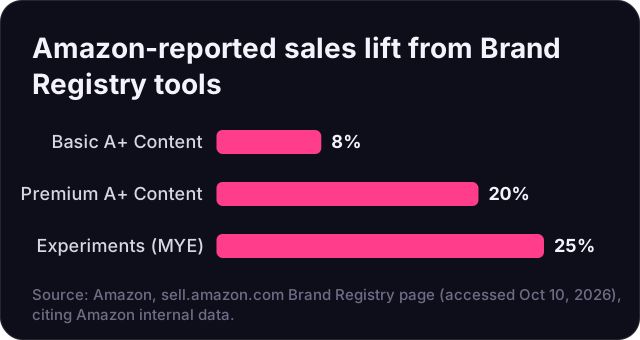
Brand Registry is Amazon's program for brand owners, usually with a registered or pending trademark (see our US trademark guide). Besides brand protection, it unlocks a set of listing, analytics and marketing tools. On its Brand Registry page, Amazon publishes figures from its internal data for several of them:
| Tool | What Amazon reports |
|---|---|
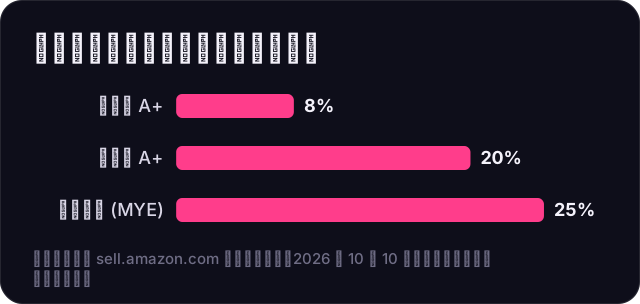
| Basic A+ Content | Can increase sales by up to 8% |
| Premium A+ Content | Can increase sales by up to 20% |
| Manage Your Experiments | Acting on optimized content can increase sales by up to 25% |
| Brand Stores | Store visitors purchase 53.9% more frequently and have a 71.3% higher average order value than non-visitors (Aug 2024 data) |
| Subscribe & Save | A 10%–15% discount can drive up to a 1.8x increase in conversion on average |
| Transparency | More than 2.7 billion product units verified as genuine (May 2026) |
Two cautions: these are "up to" figures and Amazon's own data, and the Brand Store comparison shows correlation (shoppers who visit a Store are often already keen on the brand), not proof that a Store caused the extra spending. Still, they show where Amazon sees the biggest gains.
The tools, in the order we would set them up
1. A+ Content on every parent ASIN
A+ Content replaces the plain product description with images, comparison charts and brand modules. Start with your best sellers. Use a comparison chart to cross-sell your other products, and design every module for mobile first, because most shoppers will see it on a phone.
2. Manage Your Experiments (A/B testing)
Manage Your Experiments lets you test two versions of a main image, title, bullet points or A+ Content on eligible ASINs that get enough traffic. Test one element at a time, let the test run to completion, and then apply the winner. Amazon's "up to 25%" figure is for acting on the optimized version, so the work only pays off if you actually publish the winner.
3. A Brand Store
A Brand Store is a free multi-page store on Amazon with its own URL. Use it as the landing page for Sponsored Brands ads and for external traffic. Keep the navigation simple: best sellers, categories and a few product collections. The Store's own analytics show visits, sources and sales.
4. Sponsored Brands and video ads
Sponsored Brands ads, which can show your logo, a headline and several products or a video, require Brand Registry. They work well for branded and category keywords and can send shoppers to your Store. Keep Sponsored Products as the base of your ad plan and add Sponsored Brands on proven keywords (see our bidding strategies guide).
5. Subscribe & Save for repeat products
If you sell consumables such as supplements, pet supplies or cleaning products, Subscribe & Save turns one-time buyers into repeat orders. Amazon's figure for a 10%–15% discount (up to 1.8x conversion on average) gives a useful starting point for testing. Make sure you can keep the product in stock, since subscriptions depend on it.
6. Amazon Attribution and the Brand Referral Bonus
If you send traffic from TikTok, Instagram, Google or email to Amazon, set up Amazon Attribution. Amazon describes it as "a free measurement solution" for professional sellers in Brand Registry, vendors and agencies, measuring clicks, detail page views, add-to-carts and purchases across search, social, display, video and email, with a 14-day attribution window. Brands using Attribution can also enroll in the Brand Referral Bonus, which Amazon describes as earning "credits from your non-Amazon marketing efforts." Bonus rates and rules are listed in Seller Central and may vary by category, so check them there before you build a budget around them.
7. Brand Analytics and Transparency
Brand Analytics shows search term, market basket and repeat-purchase data that is not visible to non-brand sellers; use it to find keywords and bundle ideas. If counterfeits or commingling are a problem, look at Transparency, Amazon's product serialization service.
Brand Registry growth checklist
- Confirm every ASIN is listed under your registered brand name.
- Publish A+ Content on your top 10 parent ASINs, mobile-first.
- Run one Manage Your Experiments test per month on a top seller.
- Build a simple Brand Store and point Sponsored Brands ads to it.
- Turn on Subscribe & Save for repeat-purchase products.
- Tag all external traffic with Amazon Attribution and enroll in the Brand Referral Bonus.
- Review Brand Analytics search terms every month.
How Atronia Innovations can help
We set up and manage these tools as part of our Amazon account management, and our Creative Studio add-on (+$699/mo) produces A+ Content, Store pages and video. See our plans and pricing or contact us for a free review of your brand's setup.